

As you dive deeper into image processing with OpenCV you are going to face problems that can only be solved with geometric transformations. Image too big, the shape doesn’t match your needs or you want to rotate your image for some kind of data augmentation.
All of these and many more are the most basic problems in image processing. OpenCV’s awesome toolkit has many functions that can rotate, resize and reshape images. So let’s take a look at some of them.

This bundle of e-books is specially crafted for beginners.
Everything from Python basics to the deployment of Machine Learning algorithms to production in one place.
Become a Machine Learning Superhero TODAY!
1. Affine Transformations
An affine transformation is any transformation that preserves collinearity and ratios of distances; it preserves straight points, lines, and planes. What this essentially means is that all shapes are going to remain the same, a square is still going to be a square, a rectangle will remain a rectangle etc.
Affine transformations are typically used to correct distortions or deformations that occur with non-ideal camera angles. When we say affine transformations we usually mean the following techniques: Scaling, Translation, and Rotation.

1.1 Image resizing
Images are described by their size and resolution. Resolution is determined by the number of pixels, or dots, in a linear inch. The higher the resolution, the better quality of an image you have. Image size, however, is determined by multiplying the resolution with the height and the width of an image.
As we mentioned before, sometimes we want to fit an image onto a web page or maybe we are processing images for the Convolutional Neural Network. Some of them are too big, and some of them are too small and we would like to resize them. Fortunately, OpenCV makes our job a little bit easier when it comes to resizing.
1.2 OpenCV Resize
OpenCV’s function, cv2.resize() is a very elegant way to resize an image. The function takes two required arguments, the source image we want to resize, and the size of the desired output image. You can also define scale factors along the horizontal and vertical axis and the type of interpolation.
The interpolation happens in the process of transferring an image from one size to another, and choosing a type of interpolation is just the mathematical method used for getting new pixel values. Now we know everything we need to resize the picture. Let’s take a look at the code to see how downscaling is done.
import cv2
import numpy as np

image = cv2.imread('/content/drive/MyDrive/baboon.png', 0)
image_shape, image_width, image_height = image.shape, image.shape[1], image.shape[0]

print('Original image dimension is {}'.format(image_shape))
# => Original image dimension is (512, 512)

scale_coeficient = 25/100 #percent of how much we are downscaling
new_width = int(image_width*scale_coeficient) #int is used for rounding
new_height = int(image_height*scale_coeficient)
new_shape = (new_width, new_height)
new_image = cv2.resize(image, new_shape, interpolation = cv2.INTER_AREA)

print('Resized image dimension is {}'.format(new_shape))
# => Resized image dimension is (128, 128)

cv2.imshow(image)
cv2.imshow(new_image)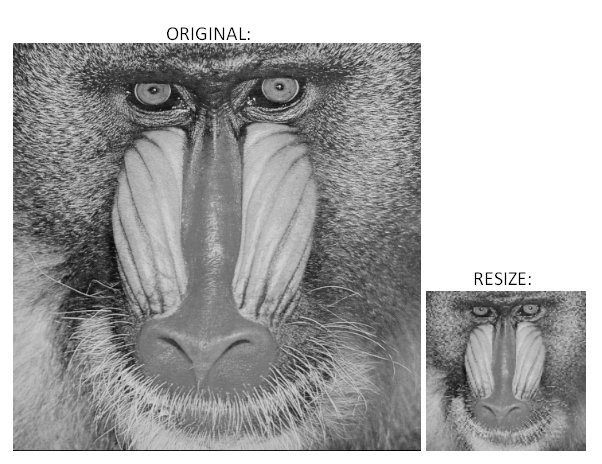
1.3 OpenCV Reshape
The difference between resizing and reshaping is that with resizing you can decrease or increase image size. By reshaping the image, you change the shape but preserve the size. For example you can resize an image from 100×100 to 20×20 or 1000×1000, with reshaping you can change it from 100×100 to 10×1000 or 20×500.
scale_coeficient_width = 0.6# => Reduced by 40%
scale_coeficient_height = 1.4 # => Increased by 40%
new_width = int(image_width*scale_coeficient_width)
new_height = int(image_height*scale_coeficient_height)
new_shape = (new_width, new_height)
new_image = cv2.resize(image, new_shape)

print(Reshaped image dimension is {}'.format(new_shape))
# => Reshaped image dimension is (716,307)
1.4 Image rotating
Image rotation is beside resizing the most basic geometric transformation in image processing. It has many applications. It is used in image correction, image alignment, data augmentation and many more. So let’s implement it in OpenCV.
Rotation in the OpenCV library can be done in multiple ways. Easier one is by using the cv2.rotate() function. This function takes two required arguments, source of an image you want to rotate and the flag that represents in which direction rotation will happen.
image = cv2.imread('/content/drive/MyDrive/lena_color.png', 0)
image_rotated = cv2.rotate(image, cv2.ROTATE_90_CLOCKWISE)
cv2_imshow(image)
cv2_imshow(image_rotated)
Image rotation also can be done by using a rotation matrix, that defines how you would like to rotate the picture. This matrix is usually of the form: [[cos(theta) -sin(theta)] [sin(theta) cos(theta)]], where the theta is the angle of rotation. Don’t let math intimidate you, as always there is an OpenCV function to help us. Rotation matrix is defined using the getRotationMatrix2D() function.
The function takes three arguments: center of rotation, angle of rotation and scale. Scale is an isotropic scale factor that scales the image up or down according to the value provided. Source image and rotation matrix are passed to the warpAffine() function, which rotates the original image:
import cv2

image = cv2.imread('/content/drive/MyDrive/lena_color.png', 0)

# Dividing height and width by 2 to get the center of the image
height, width = image.shape
center = (width/2, height/2)

#Defining a rotation matrix
rotate_matrix = cv2.getRotationMatrix2D(center=center, angle=65, scale=1)
#warpAffine takes three arguments image we want to rotate, rotation matrix, and size of an image
rotated_image = cv2.warpAffine(src=image, M=rotate_matrix, dsize=(width, height))
cv2.imshow(rotated_image)
1.4 Image Translation
Image translation is a process of moving an image to some other direction or coordinates, such that, every point in the image is moved in the same direction, and at the same distance to form an image. In other words, translation is a technique that allows us to move the image horizontally, vertically, or diagonally.
To perform a translation we need to determine the so-called translation matrix.
It is a 2×3 matrix that looks like this: [[1, 0, ‘Tx’], [0, 1, ‘Ty’]]. Tx represents the distance we want our picture to move horizontally, and naturally, Ty is described as the distance our picture will be moved by vertically. Without further ado let’s jump into the code.
import cv2

image = cv2.imread('/content/drive/MyDrive/lena_color.png', 0)

# Dividing height and width by 2 to get the center of the image
height, width = image.shape
center = (width/2, height/2)

#Defining a rotation matrix
rotate_matrix = cv2.getRotationMatrix2D(center=center, angle=65, scale=1)
#warpAffine takes three arguments image we want to rotate, rotation matrix, and size of an image
rotated_image = cv2.warpAffine(src=image, M=rotate_matrix, dsize=(width, height))
cv2.imshow(rotated_image)
As we can see we have moved the original image by one fourth of its length and height.
2. Non-Affine Transformation
Now let’s move to non-affine transformations. A non-affine transformation is a method where the sets of parallel lines do not need to remain parallel. That means that the shapes, viewpoints, and perspectives of an image are changed. They show us how perceived objects change as the observer’s viewpoint changes.
2.1 Changing perspective using OpenCV
Let’s say we have an image that was taken from an angle of 60 degrees, but we want to make it as if it was taken from a bird’s perspective.
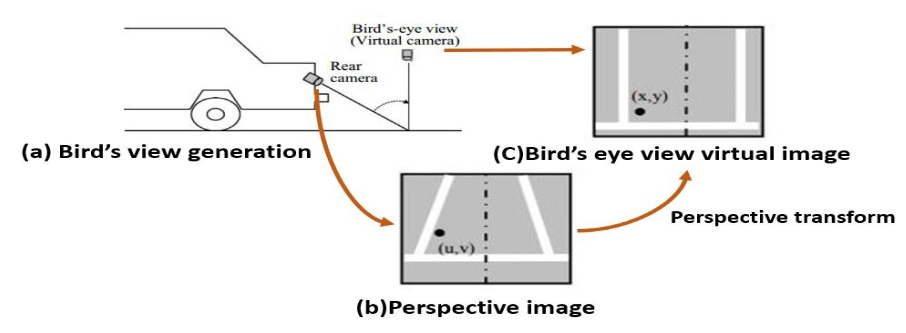
We would get the desired picture by performing a non-affine transformation on our image, so let’s dive in and take a look at how we do it.
img = cv2.imread('/content/bird.png')
print(img.shape) #(239,231)
cv2_imshow(img)
This is the picture that we want to change into a bird’s perspective. As we can see the lines that are straight and parallel actually appear not to be. First what we need to do is find the coordinates of the following points (use the cv2.imshow() function, and hover over the dots you want to know the coordinates of):
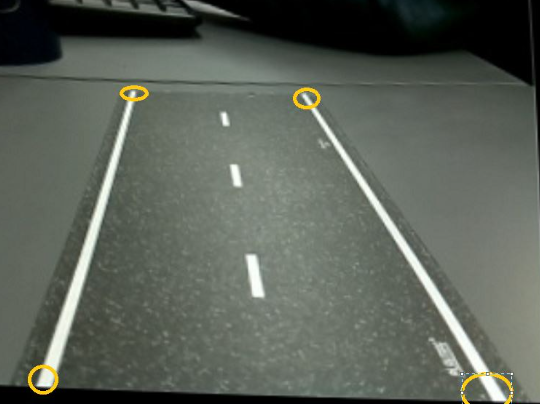
coords = np.float32([[83,67],[179,68],[31,228]])
Now we want our selected points to be the corners of our new image. Basically, we want to put our top left point as the (0,0) coordinate of the newly formed image, top right to be (width of our image, 0), bottom left to be (0,height) and bottom right to be (width,height). We can choose the width and height of our new image freely.
img = cv2.imread('/content/bird.png')
print(img.shape[:2]) #(239,231)
cv2_imshow(img)

original_coords = np.float32([[83,67],[179,67],[31,228],[289,228]]) # coordinates of our points

height,width = 200,200 #width and height of our new image
new_image_coords = np.float32([[0,0],[width,0],[0,height],[width,height]]) #setting our points as corners of our new image
P = cv2.getPerspectiveTransform(original_coords,new_image_coords) # This Function calculates the Transformation matrix,it accepts 2 parameters(original coordinates and new coordinates)
perspective_image = cv2.warpPerspective(img,P,(width,height)) # Function that warps our image,First parameter is the original image, second one is transformation matrix, third one is a tuple with width and height of our new image
cv2_imshow(perspective_image)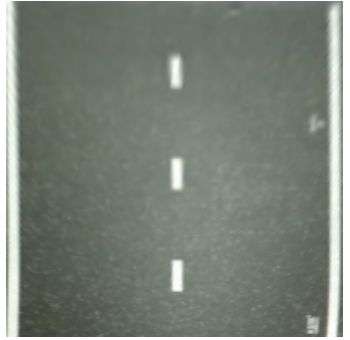
Conclusion
Geometrical transformations are really useful in image processing, but more advanced routines require a strong math foundation. In this article, we covered some basic principles of it, and we are encouraged to research more about the subject. As mentioned before geometrical transformations have many applications in image processing and computer vision. Also, we are inviting you to continue our Image processing article series.
Authors
Stefan Nidzovic
Author at Rubik's Code
Stefan Nidzovic is a student at Faculty of Technical Science, at University of Novi Sad. More precisely, department of biomedical engineering, focusing mostly on applying the knowledge of computer vision and machine learning in medicine. He is also a member of “Creative Engineering Center”, where he works on various projects, mostly in computer vision.
Milos Marinkovic
Author at Rubik's Code
Miloš Marinković is a student of Biomedical Engineering, at the Faculty of Technical Sciences, University of Novi Sad. Before he enrolled at the university, Miloš graduated from the gymnasium “Jovan Jovanović Zmaj” in 2019 in Novi Sad. Currently he is a member of “Creative Engineering Center”, where he was involved in a couple of image processing and embedded electronic projects. Also, Miloš works as an intern at BioSense Institute in Novi Sad, on projects which include bioinformatics, DNA sequence analysis and machine learning. When he was younger he was a member of the Serbian judo national team and he holds the black belt in judo.

